Friday, 20 December 2013

Monday, 16 December 2013
Creative Arts Evening Viral Video
During this creative arts evening we decided to create a viral video for our music vid in doing this we would be able to gain a wider audience and therefore gain more feedback and views for our main video as a result. Also this viral video would help us with the research and planning for our main video.
How we went about doing this was that we had set up a green screen in one of our classrooms in school which was done with green card sheets. Then we had a camera set up so that the green screen was in the whole frame.We got lots of people from our school on the night to stand in front of the camera and dance to our track which was on some speakers in the back ground.
When all the footage was shot we then edited the footage into our viral video sequence which was done in final cut pro a programme which allows you to edit footage of anything. We added many effects where by we took pictures and added them into the background of the footage which made it look like the people were actually at the scenes on screen. This was done by using the effect "chroma keying" of which can edit out and remove a specific block colour from the video. In our case this was the green background.
Here is our Viral Video:
Friday, 6 December 2013
Digipak General Conventions
 |
| Oasis DigiPak |
Looking at a few examples of the digipak the oasis one has 3 inner panels and a front and a back panel, this is a complicated type of digipak but is very achievable in what we want to do, However choosing the correct and appropriate images for these panels is key if the digipak is to do its job by promoting the CD
 |
| Conventional DigiPak |
This DigiPak is the more conventional one where by it only has 2 inside panels and a front and back panel which has usually a picture on the front which is then either continued on the back or is of another view of the front picture an example of this is the Native Woodlands Digipak below where by the wooded area picture on the front continues onto the back


Also a common convention which you will usually see on the back of the digipak cover is a barcode which is for the sale of the digipak and this is seen on almost every cover. A barcode is an optical machine-readable bit of data which is scanned by the varying the widths and spacings of the parallel lines.
Wednesday, 4 December 2013
Monday, 25 November 2013
Twitter Page (TeamGob)
This is our own team twitter page which we have set up to gain world wide feedback from a range of different sources from all over the world and from those who know a lot about the music video business and therefore can only benefit us when gaining such feedback. We feel that having a twitter account will also make our knowledge of the genre and the track much better by getting specific feedback from people and followers who like the type of music and the track we are doing our coursework on.


Wednesday, 20 November 2013
Learning A New Editing Effect (1)

Here i am trying to learn how to turn a still 2D image into a 3D tracking/panning shot as if we filmed the video.


This is really useful as you can use any image and turn it into a video with a realistic feel of being there.
After watching the tutorial i have learnt that i need to use virtual cameras within the composition. By creating a Grid and camera tracking you can create this realistic effect.
By using curves, null objects and artificial lights we can turn any 3D image into a video. the only down side to this is that it will take around 20 minutes to make a 5-10 sec clip.
I have already used After Effects behind and used 3D cameras and objects within the composition so i will find this roughly straight forward.
We are thinking of implementing this with the old man inputted onto the image dancing, by filming him separate on a green screen.
Monday, 18 November 2013
Shoot 1

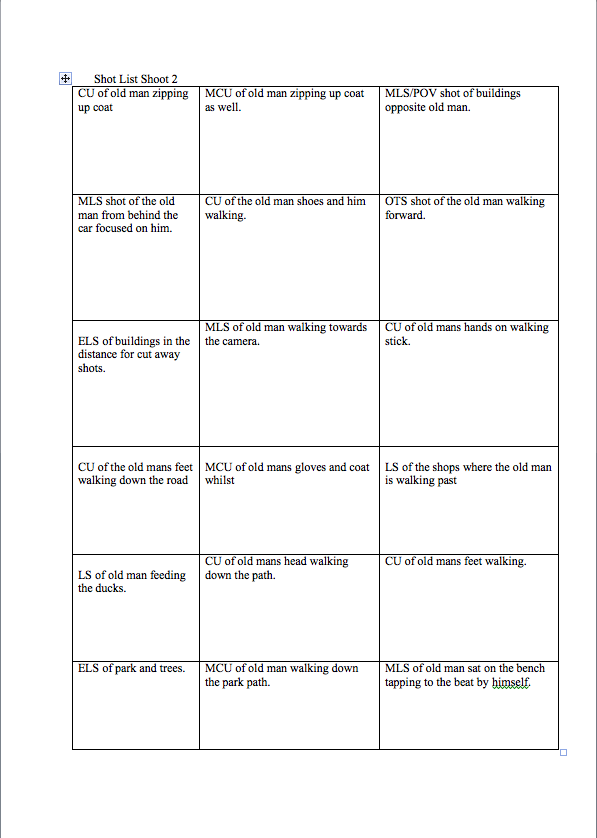
 Our first attempt to shoot the music video was in leeds on 25th Oct of which Me, Ben, Curtis, Harry and Patrick all attended to help shoot. However after getting into leeds and onto Briggate, we set up the cameras and left Paddy to o get changed. Unfortunately whilst Patrick was getting ready he ripped the masked slightly as it would not fit onto his head. This then ruined the day of the shoot as we had no one to be the Old Man Character. Here is an image of Ben preparing to film the shoot.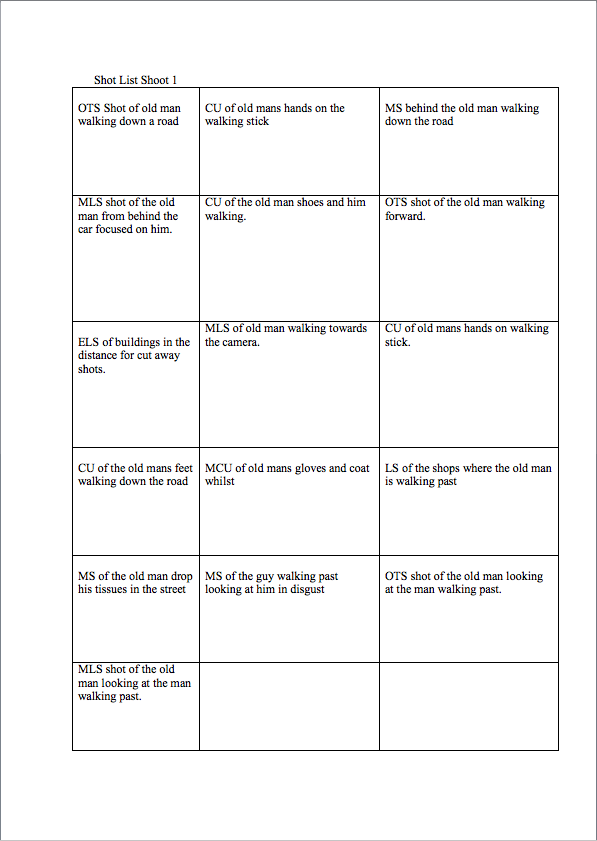


Subscribe to:
Posts (Atom)